Sky background subtraction#
This page documents SignalCreation.Lidar.Lidar.background(), which estimates and stores
the sky background per LIDAR channel (e.g., moon/sky light, detector dark counts, induced signal
baseline) using a configurable method and altitude window. The routine also writes back into the XML
the effective parameters actually used (altitude range, regression order, method, log regression).
Quick start#
#######################
#  Sky background     #
#######################
lidar.background()
What it does#
Selects raw channels whose
Signal_Typeis in [100, 119] (uncertainty channels excluded), as defined in Signal types (Signal_Type).For each channel, computes the background in a far-range altitude window using the configured method (average or weighted linear regression, optionally in log space).
Can auto-determine altitude bounds and method with heuristics if not fully specified.
Saves the background value and its uncertainty, plus fit coefficients, in the output dataset.
Updates the XML so that the final parameters are traceable.
Prerequisites & inputs#
To run, the routine needs raw LIDAR signals present in the dataset. By default these are the variables
mapped as raw lidar data in your naming configuration (often named Raw_Lidar_Data or raw_signal,
depending on your name_variables.xml).
Expected dims: typically
(altitude, time)(actual names depend on your project conventions).Channels are filtered by
Signal_Type ∈ [100, 119].
Background components (concepts)#
We group three effects under “background”:
Sky background light — sunlight, moonlight, starlight, artificial light from cities/buildings. Broadly a (wavelength-dependent) white noise, approximately independent of altitude. Time variability is generally slow but non-zero.
Detector dark noise / electronic background — even in darkness the detector and acquisition electronics produce counts. Typically white, detector-dependent, altitude-independent. In theory stable, but aging can change its level; periodic checks are recommended.
Induced signal (afterpulsing / persistence) — a light-dependent contribution where photons captured by the detector are released later. Becomes noticeable when the received signal is large; depends on altitude.
In the “background” step, we aim to remove these three contributions together. In theory, a simple average over a far-range window is enough; however, because of induced signal, a (weighted) linear regression on the far-range background is often preferred to correct the induced component. The fitted slope should be small; a large slope indicates significant induced signal or another issue.
Warning
A steep regression slope in the background fit is a red flag. Check for afterpulsing, bright clouds, or stray light. Consider narrowing the background altitude window or using robust (weighted) regression.
Note
Keep the background window away from cloud layers and from the maximum range where digitizer artifacts may appear.
Method signature#
def background(
    self,
    list_data_name: None | list = None,
    error_suffix: None | str = None,
    prefix_output_name: None | str = None,
    raw_lidar_data_prefix: str | None = None,
) -> None:
    """Compute and store the sky background for each raw LIDAR channel."""
Parameters#
list_data_name(list | None) Optional list of variable names to process. IfNone, the method discovers raw channels automatically with prefix equal toraw_lidar_data_prefixandSignal_Type ∈ [100,119].error_suffix(str | None, default: ``”_Unc”``) Suffix appended to the generated uncertainty variable name (see Variable naming and metadata configuration).prefix_output_name(str | None) Base name of the output variable(s). IfNone, uses the XML mapping forbackground(e.g.,Background).raw_lidar_data_prefix(str | None) Prefix used to identify raw channels. IfNone, uses the XML mapping forraw_lidar_data(e.g.,Raw_Lidar_Data).
XML configuration#
Configuration lives under <SkyBackground>. Typical setup:
<Dial>
  <!-- Sky background settings -->
  <SkyBackground>
    <!-- Either one value per channel (aligned with Read/Lidar_files/Signal_type) or a single
         value with apply_all="True" to use for all channels -->
    <Method apply_all="True">Weighted linear regression</Method>

    <Parameters>
      <alt_min units="m" apply_all="True">90000</alt_min>
      <alt_max units="m" apply_all="True">140000</alt_max>
      <order apply_all="True" type="int">1</order>
      <log_regression apply_all="True" type="bool">False</log_regression>
    </Parameters>

    <!-- Optional: automatic selection of window and method -->
    <auto>
      <method_alt_min>compare_slopes</method_alt_min>
      <method_alt_max>max-n</method_alt_max>
      <param_alt_max_n type="int">2</param_alt_max_n>
      <method_method>dial_v1</method_method>
    </auto>

    <!-- Compatibility flag for legacy MATLAB indexing (rare) -->
    <use_index_background_matlab_software type="bool">False</use_index_background_matlab_software>
  </SkyBackground>
</Dial>
Channel alignment#
The per-channel parameters are aligned with the ordered list in
Read/Lidar_files/Signal_type. Internally, the code finds the index of the current channel in that list,
and uses the corresponding item from alt_min, alt_max, order, log_regression and Method.
If you prefer a single value for all channels, set the attribute apply_all="True" on the XML tag;
the code will broadcast this value.
Use of simulated signals (optional)#
If present, the function uses a simulated raw signal for the same Signal_Type (variable starting with
Simulated_Raw_Lidar_Data) as a reference in the automatic selection logic and diagnostics.
See Creating a simulated LIDAR signal.
Internal workflow#
Select inputs Build the list of raw variables matching
raw_lidar_data_prefixandSignal_Type ∈ [100,119].Read parameters Load per-channel or broadcast values for: method,
alt_min,alt_max, polynomialorder, andlog_regression. Load optional auto-selection strategies.Compute background For each channel, call the internal routine (
get_sky_background) to estimate: - background value, - regression coefficients (if method is a regression), - background uncertainty, - and the effective parameters actually used.Write output variables One background variable per channel is added (name based on
prefix_output_name), with attributes:background_coefficients,Signal_Type,bin_width,laser_shot. An uncertainty variable is written alongside (name +error_suffix).Persist parameters Update the XML at: -
SkyBackground/Method-SkyBackground/Parameters/alt_min-SkyBackground/Parameters/alt_max-SkyBackground/Parameters/order-SkyBackground/Parameters/log_regression
Outputs in the dataset#
For each processed channel the routine creates two DataArrays (same grid as the input channel):
Background (e.g.,
Background_0) — background estimate on the native grid(altitude, time).Background uncertainty (e.g.,
Background_0_Unc) — uncertainty of the estimate on the same grid.
Typical attributes stored:
background_coefficients(list serialized as comma-separated string)Signal_Type(copied from source channel)bin_widthandlaser_shot(copied from source channel)
Example usage#
Standard run (all from XML):
from SignalCreation.Lidar import Lidar

lidar = Lidar("Configuration_files/Parameters/example_station.xml", "2024-03-28")
lidar.import_lidar_data()
lidar.import_atmospheric_component()
lidar.import_other_atmospheric_component("ozone")
lidar.create_simulated_lidar()  # optional but recommended for robust background windows

# Compute background per channel
lidar.background()

# Inspect outputs
[v for v in lidar._lidar.data_vars if "Background" in v]
Custom names (override prefixes/suffixes):
lidar.background(
    prefix_output_name="Background",        # or any mapped name in name_variables.xml
    raw_lidar_data_prefix="Raw_Lidar_Data", # consistent with your naming config
    error_suffix="_Unc"
)
Quality checks & tips#
Altitude window: choose regions with minimal atmospheric signal (very high altitude) to avoid bias from molecular/aerosol returns. The automatic heuristics (
compare_slopes,max-n) help refine bounds but should be validated visually.Log regression: enable
log_regression=Trueonly when the baseline follows a log-linear trend in PR²; otherwise use average or linear regression in linear space.Slope sanity: verify the fitted slope is small; large slopes suggest afterpulsing or contamination.
Per-channel configuration: ensure the order of values in
alt_min,alt_max, etc., matches the order ofRead/Lidar_files/Signal_type.Naming & uncertainties: background and its uncertainty follow your Variable naming and metadata configuration rules (delimiter, digits, uncertainty suffix).
Figure#
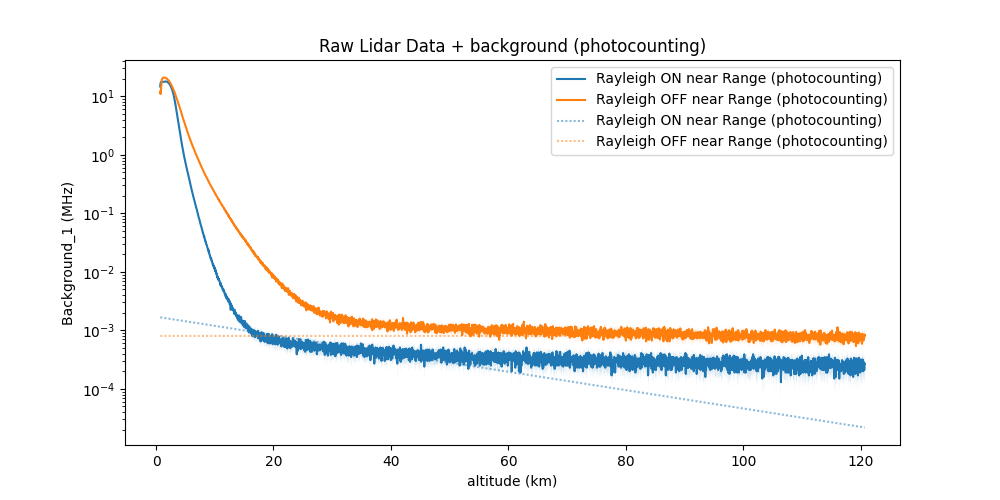
Example of far-range window and fitted background.#